NDi Signal Stabilizer

Stable resolution. Reliable signals.
NDI Signal Stabilizer is a Windows tool that brings changing NDI input signals to a fixed output resolution and frame rate. This gives connected decoders, displays and production systems a constant video format – even if the source changes its resolution during operation.
Some NDI sources (e.g. teams) automatically reduce their resolution not only the bitrate when bandwidth is tight. When converting to HDMI or SDI, this can cause flickers in the decoder, scaling changes or short interruptions.
NDI Signal Stabilizer receives these signals, scales them to the desired format and provides them as separate NDI outputs on the network.
The benefits
A constant starting format ensures predictable conditions in your video production. Source resolution changes are intercepted before they reach your downstream devices.
The tool is particularly suitable for live events, presentations, conference productions and installations with NDI-to-HDMI or NDI-to-SDI decoders.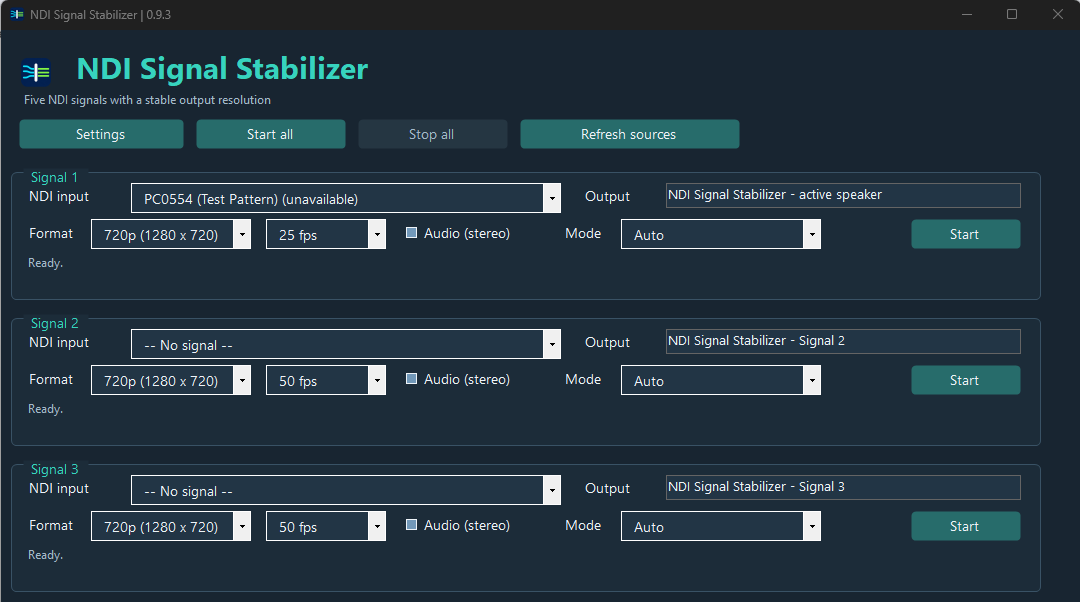
The functions at a glance
- Up to five independent signals
Stabilize multiple NDI sources simultaneously – with their own settings and source names for each channel. - Fixed output in 720p or 1080p
Choose the appropriate resolution for your use. With limited system resources, 720p is the starting point. - Selectable frame rate
Support is provided for 25, 29.97, 30, 50, 59.94 and 60 frames per second. - Processing via Auto, GPU or CPU
Use compatible graphics hardware for scaling or select CPU processing. In Auto mode, the tool changes to the CPU in the event of a GPU processing error. - Optional stereo audio
Audio can be activated individually for each channel and is turned off by default. - Saved settings
Source selection, source names and channel settings are retained at the next program start. - CPU and GPU load indicator
A compact display helps you to keep an eye on the system load during operation. - German and English surface
The language can be switched in the settings. - Optional Autostart and Update Check
If desired, the program starts after the Windows login and checks for new versions when the program starts. Both options are off by default. - Direct access to the version archive
Using the settings, you can reach earlier versions and the associated release notes.
Developed for everyday production
Select sources, set starting format and start the required signals. The surface keeps all five channels accessible in one window. Signals can be started and stopped individually or together.
NDI Signal Stabilizer keeps the selected output format constant. Already lost image details or images at the source can not restore it. The required computing power depends on the hardware, the input formats and the number of active signals. Unlike other software, however, it requires rather few resources.
Conditions: Windows 10 or 11 with 64 bit, .NET Framework 4.8 and a compatible NDI Runtime. The installer checks the required components before installation. 
Have fun with it :
Would you like to support my projects and thus make a contribution so that I can continue to offer the scripts and tools for free. Then I would be happy about a support contribution.
This is, of course, absolutely voluntary.