Shure Microflex Dashboard (MXWAPT8)
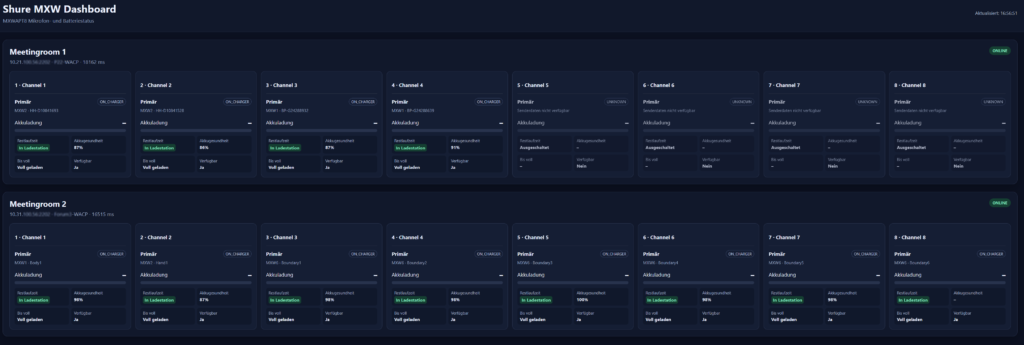
For monitoring the battery levels and whether the Shure Microflex microphones standing in the meeting room again on the charging station after the event, I made a small script. Surely interesting for meeting rooms in companies or in schools / university campuses.
It shows the active microphones in use deposited green. Via a threshold value in the config you can set when the microphone orange (warning) is stored, e.g. battery life <1 std and when they are stored red (critical), e.g. <30min.
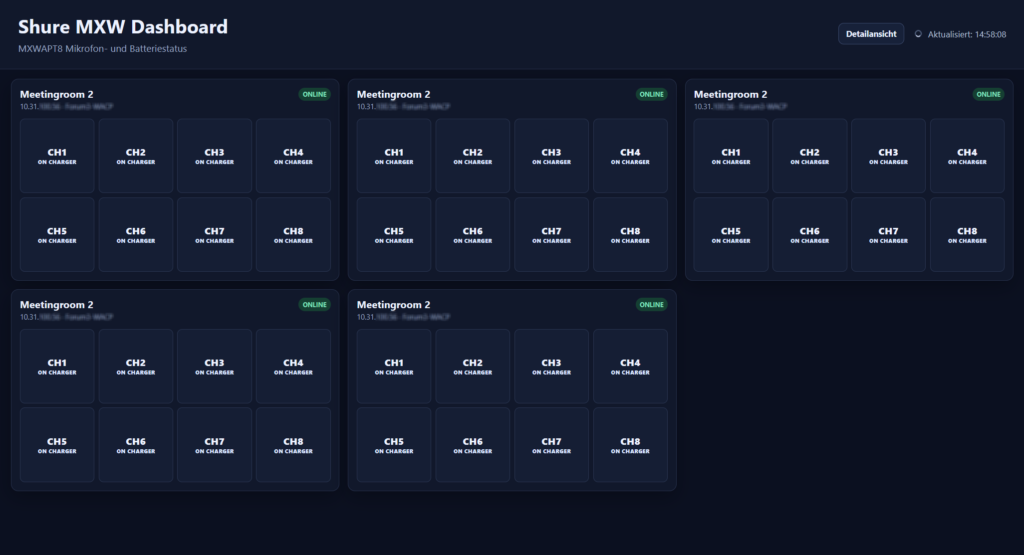
At the top right you can switch to a compact view if you have many rooms with the Shure They want to monitor microphones. How many rooms are displayed per row can be defined via the Config.
Attach the link to the download (ZIP) of the project files. mxw-dashboard.zip

System requirements
Servers
- Windows 11, Windows Server or other system with PHP support, e.g. Xampp
- PHP 8.1 or later
- PHP function fsockopen() available
- Apache/XAMPP or IIS; alternatively PHP web server for tests
Network
- Web server can reach all MXWAPT8 via IP
- TCP port 2202 accessible from the web server to the access points
- With VLANs: routing and firewall releases available
- The browser does not need direct access to the MXWAPT8 devices
Install on Windows 11 with XAMPP
- Install XAMPP.
- Start in the XAMPP Control Panel Apache.
- Copy project folder to C:\xampp\htdocs\mxw-dashboard\.
- edit config.json and enter access points.
- In the browser http://localhost/mxw-dashboard/ open.
Access from another computer on the network:
http://IP-DES-WINDOWS-RECHNERS/mxw-dashboard/Configuration
The central configuration is in config.json. Changes are adopted in the next browser queries.
{
  "refresh_seconds": 10,
  "socket_timeout_seconds": 2.0,
  "battery_health_warning_percent": 70,
  "runtime_warning_minutes": 60,
  "runtime_critical_minutes": 30,
  "access_points": [
    {
      "name": "Sitzungssaal",
      "ip": "192.168.10.51",
      "port": 2202
    },
    {
      "name": "Konferenzraum",
      "ip": "192.168.10.52",
      "port": 2202
    }
  ],
  "compact_max_rooms_per_row": 5
}
Configuration parameters
| Parameters | Standard | Description |
| refresh seconds | 10 | Web interface update interval in seconds. |
| socket timeout seconds | 2.0 | Timeout for the TCP connection to MXWAPT8. |
| battery health warning percent | 70 | Below this value, battery health is marked red. |
| runtime warning minutes | 60 | Below this value, an active channel becomes orange. |
| runtime critical minutes | 30 | At this value or below, the channel turns red. |
| compact max rooms per row | 5 | Maximum number of rooms next to each other in the compact view. |
| access points | – | List of access points with name, IP address and TCP port. |
Operation
After opening, all access points entered in config.json are automatically queried. In the head area, it is possible to switch between detailed and compact views; The browser remembers the last view used.
- Detailed view: complete transmitter and battery data per channel
- Compact view: one small box per room with CH1 to CH8
- Automatic update according to refresh seconds
- ONLINE/OFFLINE display per access point
Details
The header of each room map shows the configured room name, the IP address and, if supplied by the device, the device/antenna name.
- Channel number and channel name
- Primary/secondary transmitter
- Transmitter type and transmitter ID
- Status
- Battery charge
- Residual maturity
- Battery health
- Time to full
- Availability
Compact view
The compact view is optimized for installations with many meeting rooms. Only one compact box appears per room. Below this, CH 1 to CH 8 are shown as quadratic status fields.
Under the channel number appears the short status ACTIVE, MUTE, ON CHARGER, LEARN or another status reported by the device. A mouseover shows additional information in the tooltip.
The maximum number of rooms per line is controlled via compact max rooms per row in the confi file. On smaller displays, the number of columns is automatically reduced.
Have fun with the script
Would you like to support my projects and thus make a contribution so that I can continue to offer the scripts and tools for free. Then I would be happy about a support contribution.
This is, of course, absolutely voluntary.
Das könnte Sie auch interessieren
Panasonic multi-projector dashboard
Panasonic Dashboard V2 - Server Variant
